站内导读
中文
定位:Mika 是一款安卓端 AI 助手,说一句需求,它就在后台隐藏屏幕上操作 App 与网页把事做完,项目由 wangzan101 开源。
核心能力
- 在独立的后台隐藏屏上执行点击、滚动等 UI 操作,前台仍可继续用手机,两条线互不打断。
- 用自然语言驱动第三方 App:滚动翻阅微信群聊后给出当天汇总,或逐个打开帖子归纳内容。
- 也覆盖网页流程,例如按 30 美元以内、4.5 星以上挑充电器,加入购物车并在结算前停下。
- 采用 Apache-2.0 许可,APK 经 GitHub Releases 分发,运行要求 Android 11 及以上。
适用人群:适合想把聊天、购物、社交浏览这类重复操作交给一句话完成的安卓用户,需要一台 Android 11 及以上的手机,并从 Releases 下载安装 APK;开发者也可直接读源码。
日本語
位置づけ:Mika は wangzan101 がオープンソースで公開している Android 向け AI アシスタントです。要望を一言伝えるだけで、バックグラウンドの非表示画面上でアプリや Web を操作し、タスクを最後まで実行します。
主な機能
- 独立したバックグラウンドの非表示画面でタップやスクロールなどの UI 操作を行うため、タスク実行中もフォアグラウンドでスマートフォンをそのまま使い続けられます。
- 自然言語でサードパーティ製アプリを操作します。たとえば WeChat のグループチャットをスクロールして閲覧し、その日のやり取りをまとめるといった使い方ができます。
- Web 上の流れにも対応します。たとえば 30 ドル以下で評価 4.5 以上の充電器を選び、カートに入れて決済の直前で止めるといった処理が可能です。
- Apache-2.0 ライセンスで、APK は GitHub Releases から配布されます。動作には Android 11 以降が必要です。
対象ユーザー:チャット、買い物、SNS の閲覧といった繰り返しの操作を一言で済ませたい Android ユーザー。Android 11 以降のスマートフォンを用意し、Releases から APK をダウンロードしてインストールします。開発者がソースコードを読むこともできます。
한국어
정의: Mika는 wangzan101이 오픈소스로 공개한 Android용 AI 어시스턴트입니다. 원하는 일을 한마디로 말하면 백그라운드의 숨겨진 화면에서 앱과 웹을 조작해 작업을 끝까지 수행합니다.
핵심 기능
- 별도의 백그라운드 숨김 화면에서 탭과 스크롤 같은 UI 조작을 수행하므로, 작업이 실행되는 동안에도 포그라운드에서 휴대폰을 그대로 사용할 수 있습니다.
- 자연어로 서드파티 앱을 조작합니다. 예를 들어 WeChat 그룹 채팅을 스크롤해 살펴본 뒤 그날의 대화를 요약하는 식으로 사용할 수 있습니다.
- 웹 흐름도 지원합니다. 예를 들어 30달러 이하이면서 평점 4.5 이상인 충전기를 골라 장바구니에 담고 결제 직전에 멈추는 처리가 가능합니다.
- Apache-2.0 라이선스이며 APK는 GitHub Releases를 통해 배포됩니다. 실행에는 Android 11 이상이 필요합니다.
대상 사용자: 채팅, 쇼핑, 소셜 브라우징 같은 반복 작업을 한마디로 처리하고 싶은 Android 사용자. Android 11 이상 휴대폰이 필요하며 Releases에서 APK를 내려받아 설치합니다. 개발자가 소스 코드를 직접 읽을 수도 있습니다.
English
What it is: Mika is an open-source Android assistant by wangzan101. You state a request in one sentence, and it operates apps and the web on a hidden background screen until the task is finished.
Key capabilities
- Runs taps and scrolling on a separate hidden screen, so the foreground phone stays usable while a task runs.
- Drives third-party apps from natural language: scrolls a WeChat group and summarizes the day's chat.
- Covers web flows too: picks a charger under $30 with 4.5+ stars, adds it to the cart, stops before checkout.
- Apache-2.0 licensed, APK shipped via GitHub Releases; the app requires Android 11 or newer.
Who it is for: Android users who want repetitive chat, shopping or social browsing handled from one line of text.
README · 详细文档
来源 · 查看原文

Mika
An AI assistant on your phone: say what you need, and it works your apps and the web until it's done.
It works on a hidden background screen, so you can keep using your phone.




English · 简体中文 · 繁體中文 · 日本語 · 한국어 · Español
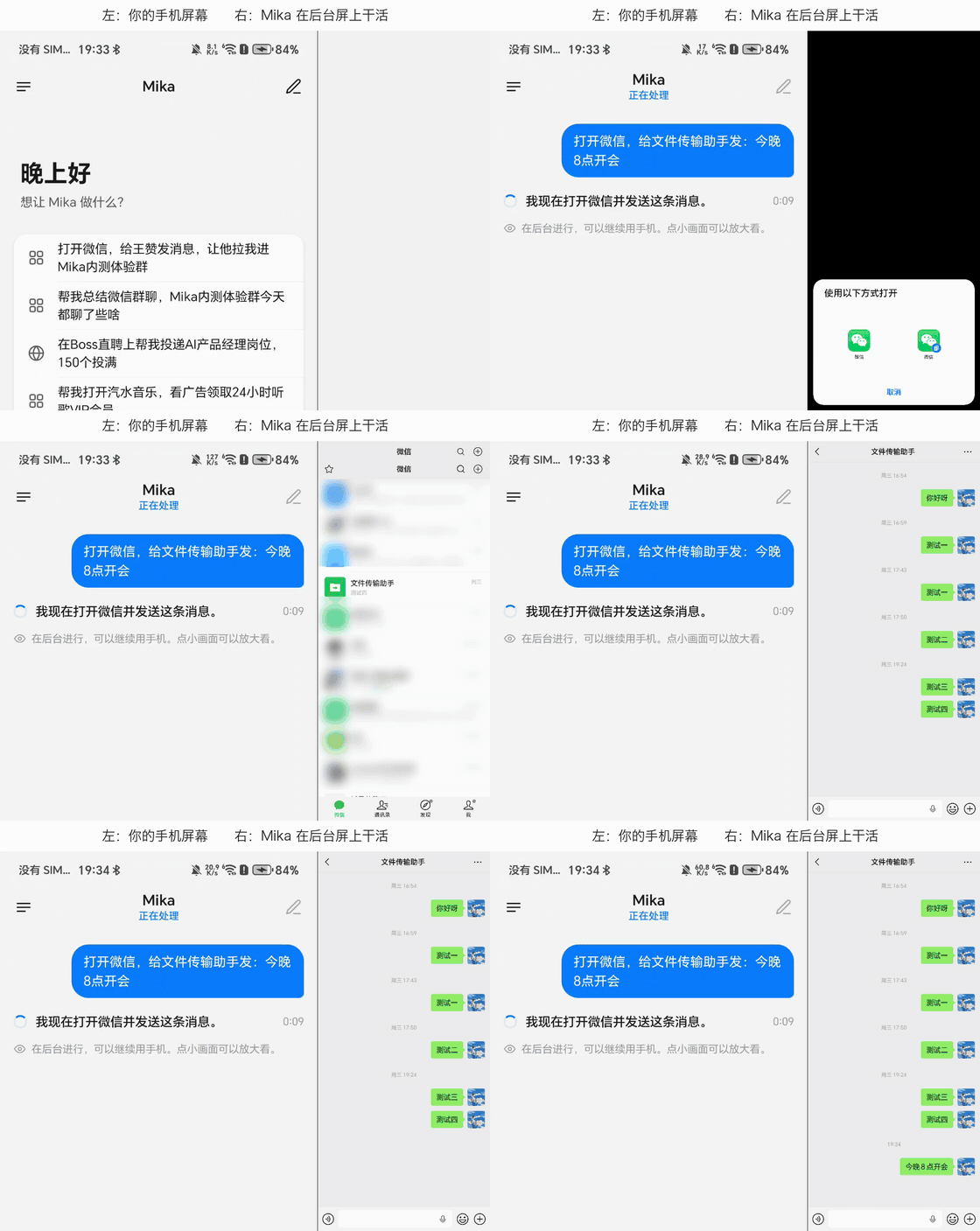
"Send a message to File Transfer": Mika's chat on the left, each step on its background screen on the right (4× speed; chat list blurred)
Get things done with one sentence
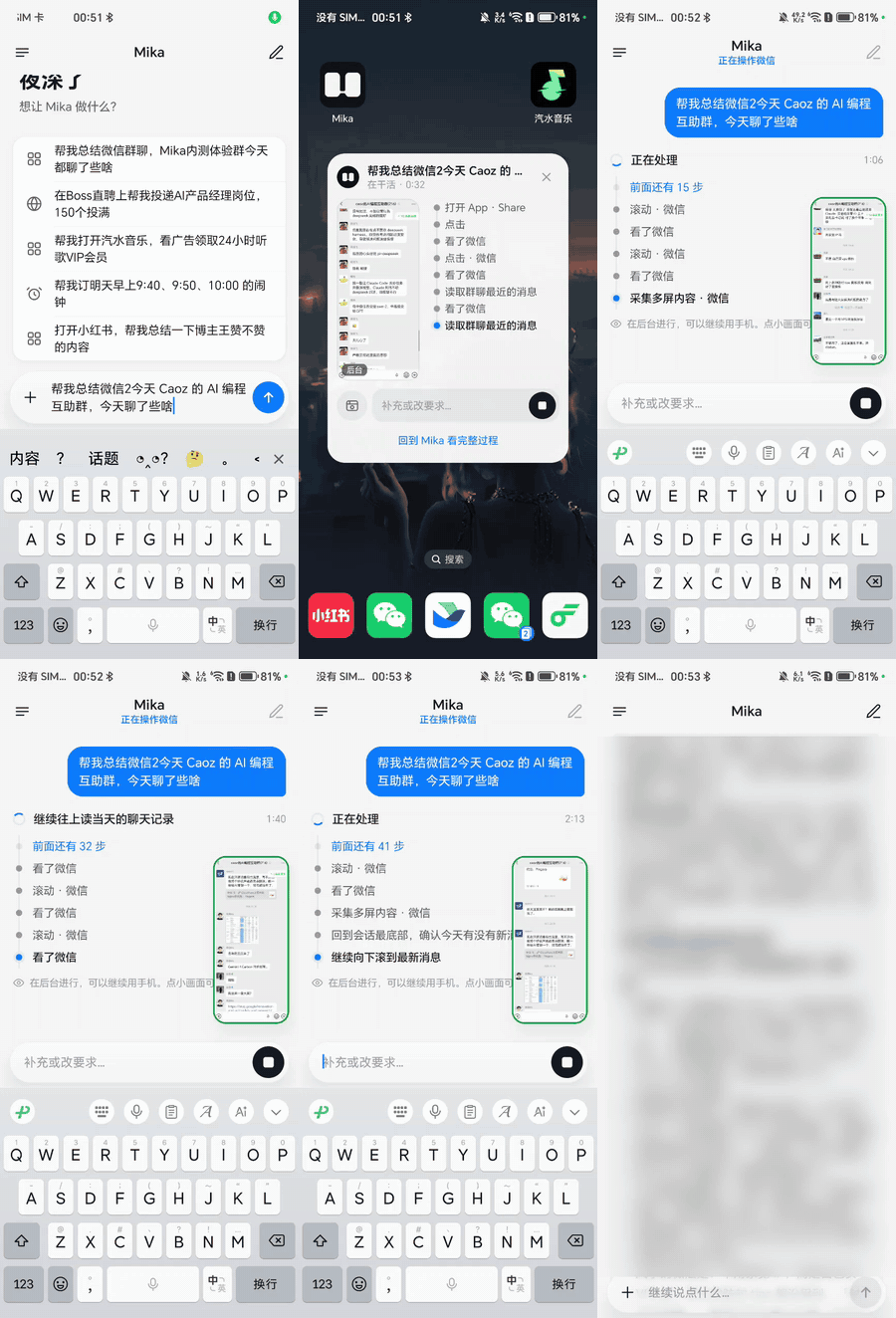 "What did the group talk about today?" Scrolls through the chat in the background, then sums it up |
 "A charger under $30, rated 4.5 stars or more" Adds the pick to the cart and stops before checkout |
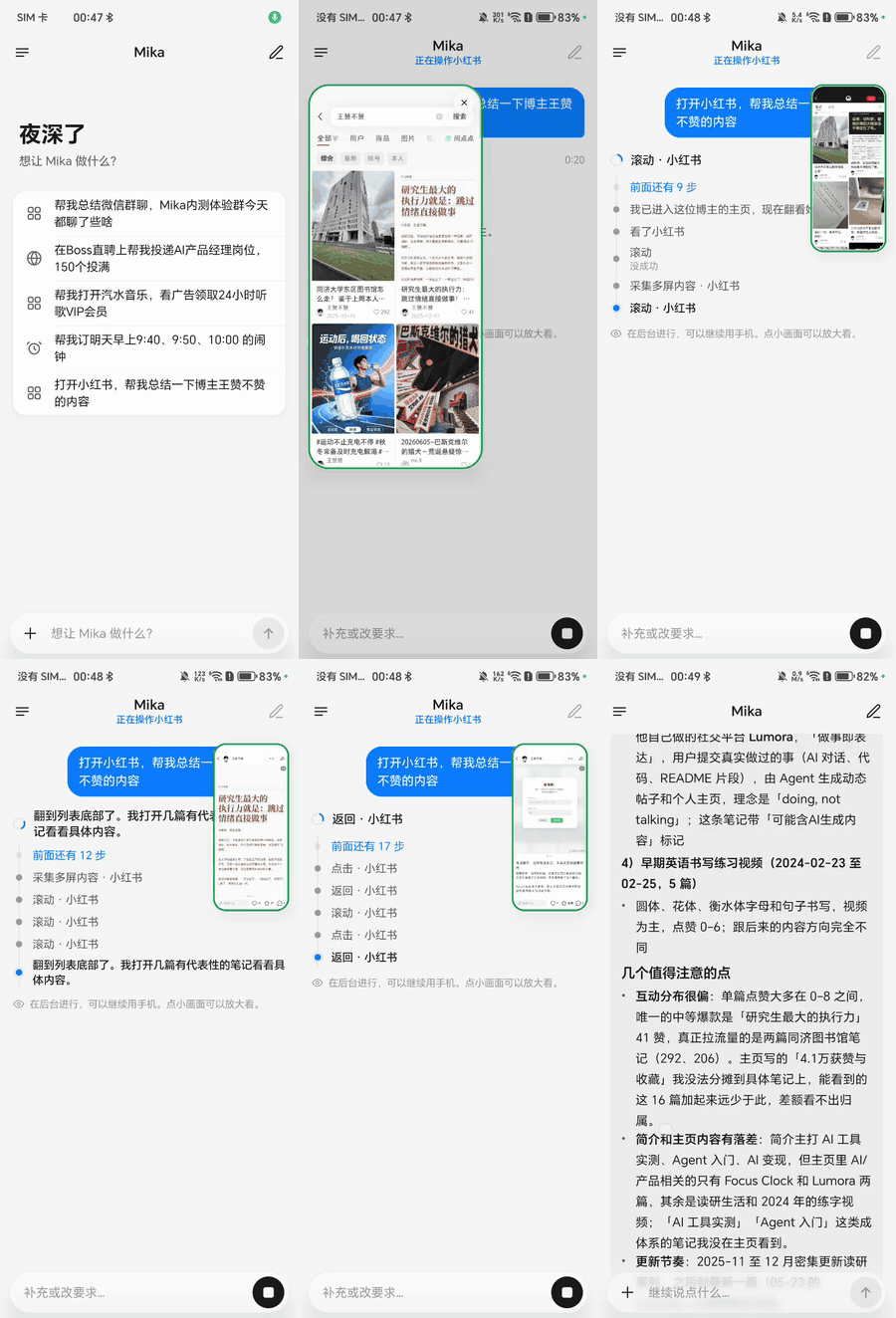 "What has this creator posted lately?" Opens the app, reads post by post, then sums it up |
More demos
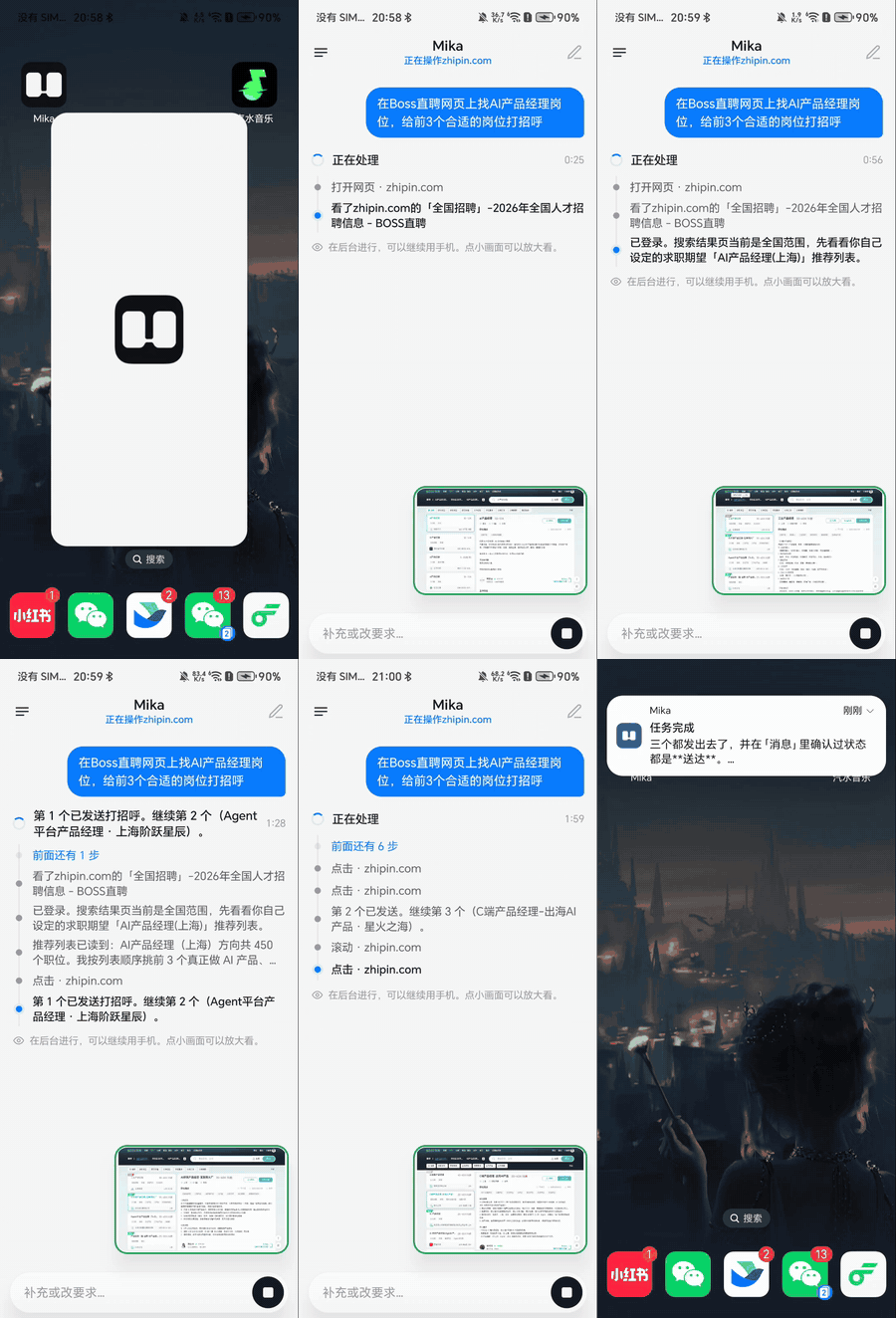 Greets recruiters for 3 jobs on a job site |
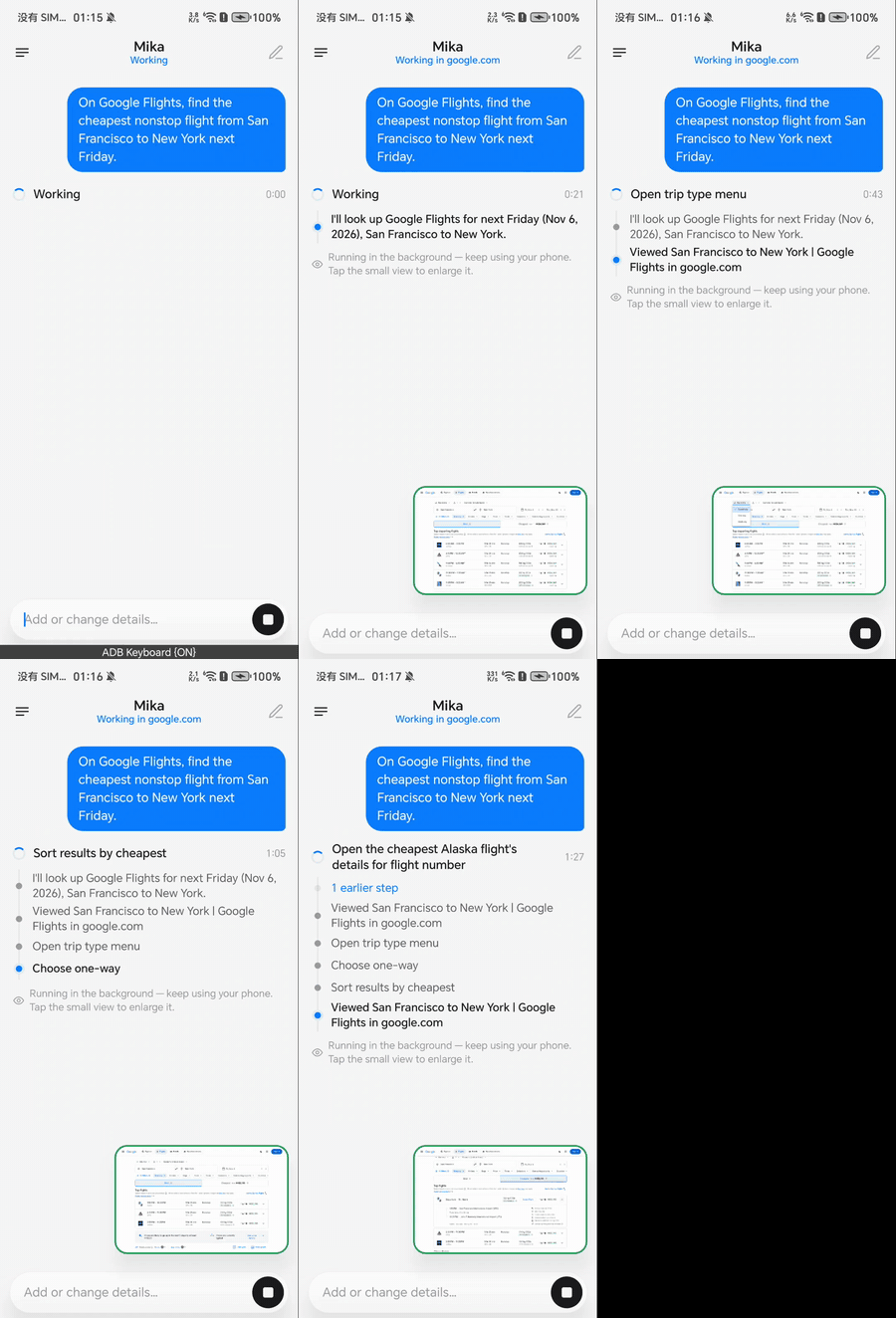 Finds the cheapest nonstop from San Francisco to New York |
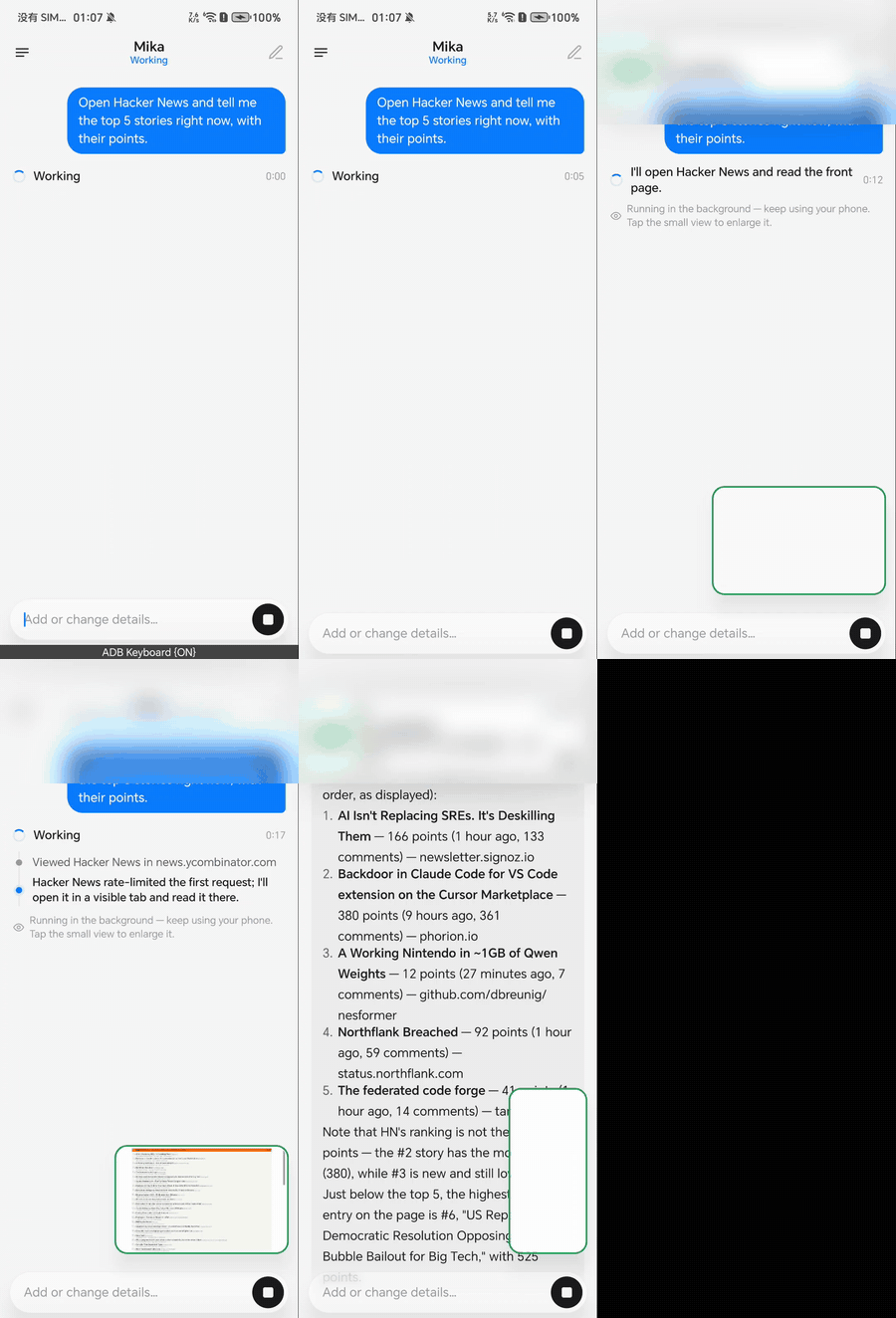 Reads out the top 5 stories on a news site |
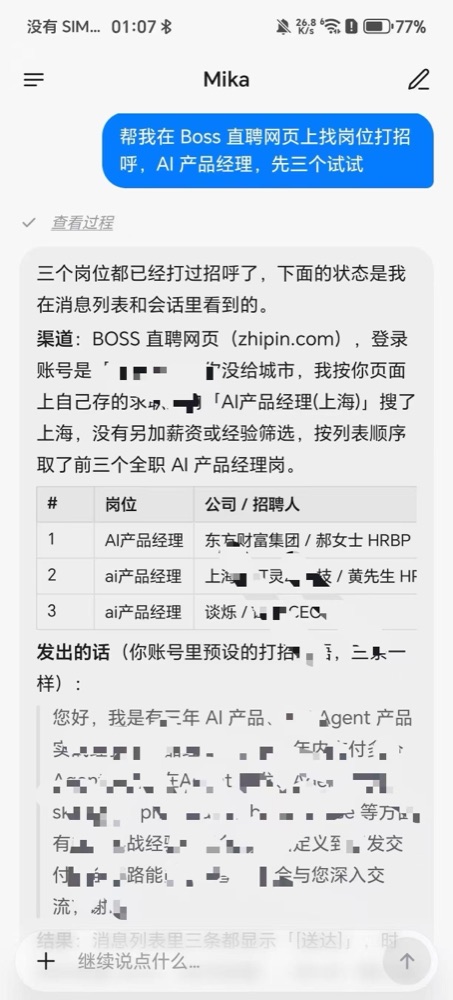 Finds jobs and greets recruiters |
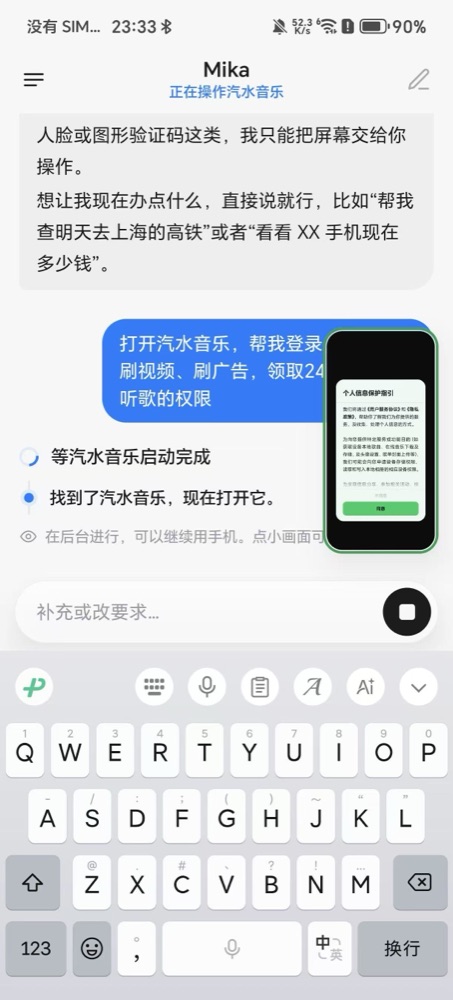 Watches ads to unlock music perks |
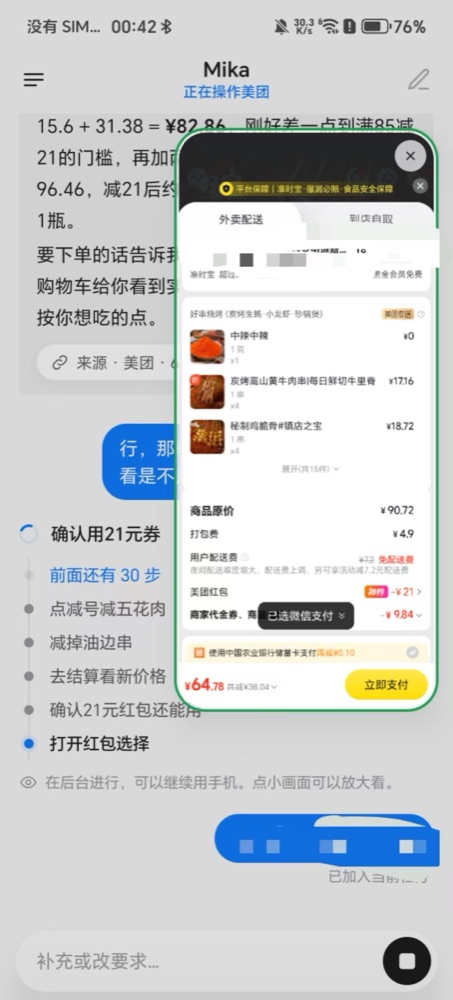 Orders takeout with stacked discounts, asks before paying |
Several demos use apps popular in China: WeChat is the main messaging app there, and Xiaohongshu (RED) is a lifestyle and social platform. Mika isn't tied to them; it works with any app or website on your phone.
Why Mika
| 📱 Leaves your screen alone | Opens apps, taps, types and scrolls on a separate background screen while you use your phone as usual; tap the small live view whenever you want to watch |
| 🧩 Works with any app | Looks at the screen and finds buttons the way a person does: no app APIs, no per-app integration |
| 🌐 Call it from any web page | In the built-in browser, say what you want on the page you're reading and it works right there; touch the page and it stops |
| 🧠 Gets better with use | Remembers the preferences you tell it, and turns tasks it finishes into skills so next time is faster and steadier |
| 🔒 Your data stays on your phone | There is no Mika server; use your own model API key, or sign in with a ChatGPT, xAI or OpenRouter account |
| 🆓 Open source and free | Apache-2.0, all code public |
Get started in three steps
- Install: download the APK from Releases.
- Connect a model: in Settings › Model, pick a provider and enter an API key, or just sign in with an account (models and sign-in).
- To operate phone apps: follow the "Set up phone control" wizard in Settings and pair wireless debugging on the phone once (setup guide). Skip this if you only want chat, web and files.
Then try saying: "Set alarms for 9:40 and 10:00 tomorrow morning" or "Check the weather at 8 every morning and tell me only if it will rain".
💡 Have a computer handy? Send this to the AI agent on it and it will set everything up for you:
Follow https://github.com/wangzan101/Mika/blob/main/docs/install-with-agent.en.md to install Mika on the Android phone connected over USB.
What it can do
| Operate apps | Reads long lists and chat histories, taps and types, shares text into apps; hands logins, verification codes and payments to you |
| Browse the web | A built-in desktop-class browser that keeps you signed in, reads pages, downloads and uploads; paces itself and hands block pages to you |
| Your current screen | Double-tap the floating capsule to send the screen you're looking at: "how should I reply?", "note this down" |
| Schedules and conditions | "Remind me at 9 tomorrow", "do this every Friday"; runs on time in the original conversation |
| Jump in or stop anytime | Keep talking while a task runs to add or correct things (long-press to withdraw or edit one Mika hasn't picked up yet); after a stop it reports where it got to, and "continue" picks up from there |
| Hold to talk | Hold the chat input to speak and edit the words before sending; long-press the floating capsule to speak and release to send. Uses the phone’s built-in speech recognition, or a provider’s speech model if it has none |
| Files and computing | A Linux sandbox per conversation runs Python, Node and shell on the files you send (arm64) |
| From your computer | AI tools on your computer can hand Mika tasks through CLI + Skill or MCP (use Mika from a computer) |
By default Mika runs in Ask mode: it checks with you only before spending money (placing orders, paying) and just does everything else. You can switch to Autonomous mode instead. See Ask and Autonomous.
For how each of these works and the finer details, see features in detail.
Apps and websites with built-in usage knowledge (anything not listed still works)
The names are shown as they appear in the knowledge files.
| Category | Built in |
|---|---|
| Apps | Android 设置, 百家号, 哔哩哔哩, BOSS直聘, Chrome, 得到, 抖音, 飞书, Gmail, 即刻, 快手, 领英, QQ邮箱, Telegram, 今日头条, Uber, Uber Eats, 微信, 微博, WhatsApp, X, 闲鱼, 小红书, 知乎 |
| Websites | Amazon, 哔哩哔哩, Google Calendar, 豆瓣, 抖音, Instagram, Gmail, Google Maps, Telegram, 百度贴吧, 微博, 搜狗微信, WhatsApp, 小红书, 小宇宙, YouTube, 知乎, BOSS直聘 |
| How-to skills | 改 Mika 自己的设置, 把内容整理成文字, 处理 PDF 文档, 查清一件事, 消息与邮件, 写技能 |
Supported model providers
Presets for DeepSeek, 通义千问, Kimi, 智谱, 智谱 Coding Plan, 硅基流动, 火山方舟, MiniMax, 阶跃星辰, 腾讯混元, 百度千帆, OpenRouter, Requesty, OpenCode Go, Anthropic, Gemini, OpenAI, xAI, Mistral, Groq, Ollama, LM Studio and more; for any other provider pick Custom (自定义), which takes any OpenAI-compatible, Anthropic, Gemini or OpenAI Responses endpoint.
You can also skip the key and sign in with a ChatGPT (Plus / Pro), xAI / Grok or OpenRouter account. Steps for adding a model, and what to know about each sign-in, are in models and sign-in.
Which phones
| Requirement | |
|---|---|
| Chat, web, files | Android 11 or later |
| Operating phone apps | Android 12 or later; Android 14+ recommended (the background screen has its own focus, so it doesn't get in the way of your typing on the main screen) |
| Linux sandbox | arm64 devices |
Not sure your phone is up to it? Run Settings › Recovery & repair › Compatibility self-check: 12 checks in about a minute, and you can send us the results in one tap.
Privacy & safety
- There is no Mika server: what you say and what's on your screen go only to the model provider you set up.
- API keys and memories are stored encrypted on the phone; conversations and run records stay on the device; update checks only contact GitHub.
- Operating third-party apps and websites automatically may break their terms of service, so use your own judgment. For anything important, use Ask mode and check the results. See the disclaimer.
FAQ
Wireless debugging turned itself off? Android turns it off when you change Wi-Fi or restart. With your permission, Mika turns it back on by itself; if it still can't connect, go back to "Set up phone control" and pair again.
Can't find wireless debugging on my phone? Some phone systems leave it out. You can start the phone helper from a computer over USB instead; see the setup guide.
Some screens can't be read or captured? Pages like payments and password entry block screenshots, so Mika asks you to take over there.
Can I use a model running on my own computer? Yes: pick "Custom" as the provider and enter its address on your local network.
Is the app in English? Yes. The app UI comes in English, Arabic, Simplified Chinese, Traditional Chinese, Japanese, Korean, Spanish, Portuguese, Russian and Indonesian, follows your system language, and can be switched in Settings › Language. The built-in app and website knowledge is written in Chinese, but that doesn't limit you: the model reads it fine, and you can talk to Mika in English.
Where do updates come from? Only from this repository's Releases; you can also upgrade in the app from About › Check for updates.
More answers are in the FAQ.
Community & contributing
- Docs: all docs and a suggested reading order are in the docs index
- Community: join the X group chat; to reach the author on WeChat, scan the QR code in the app under About › Contact the author (mention Mika in your request)
- Follow the author: X @wangzan101
- Report a problem: open an issue; About › Send feedback in the app can attach diagnostics
- Contribute: add usage knowledge for an app or website (plain text, no code needed), or contribute code; see the contributing guide
Star History
Contributors
Thanks to everyone who has helped build Mika:
License
Apache-2.0 · NOTICE · Third-party components